


Starter + Social
Save A$161Ads and social media for one business
A$440 a month
A$440a month
- 2 ad platforms, 20 campaigns a month
- 75 AI pictures and 16 AI videos a month
- 5 social accounts, 60 posts a month
Black Friday deal: $69 a month for 12 months · Cancel anytime
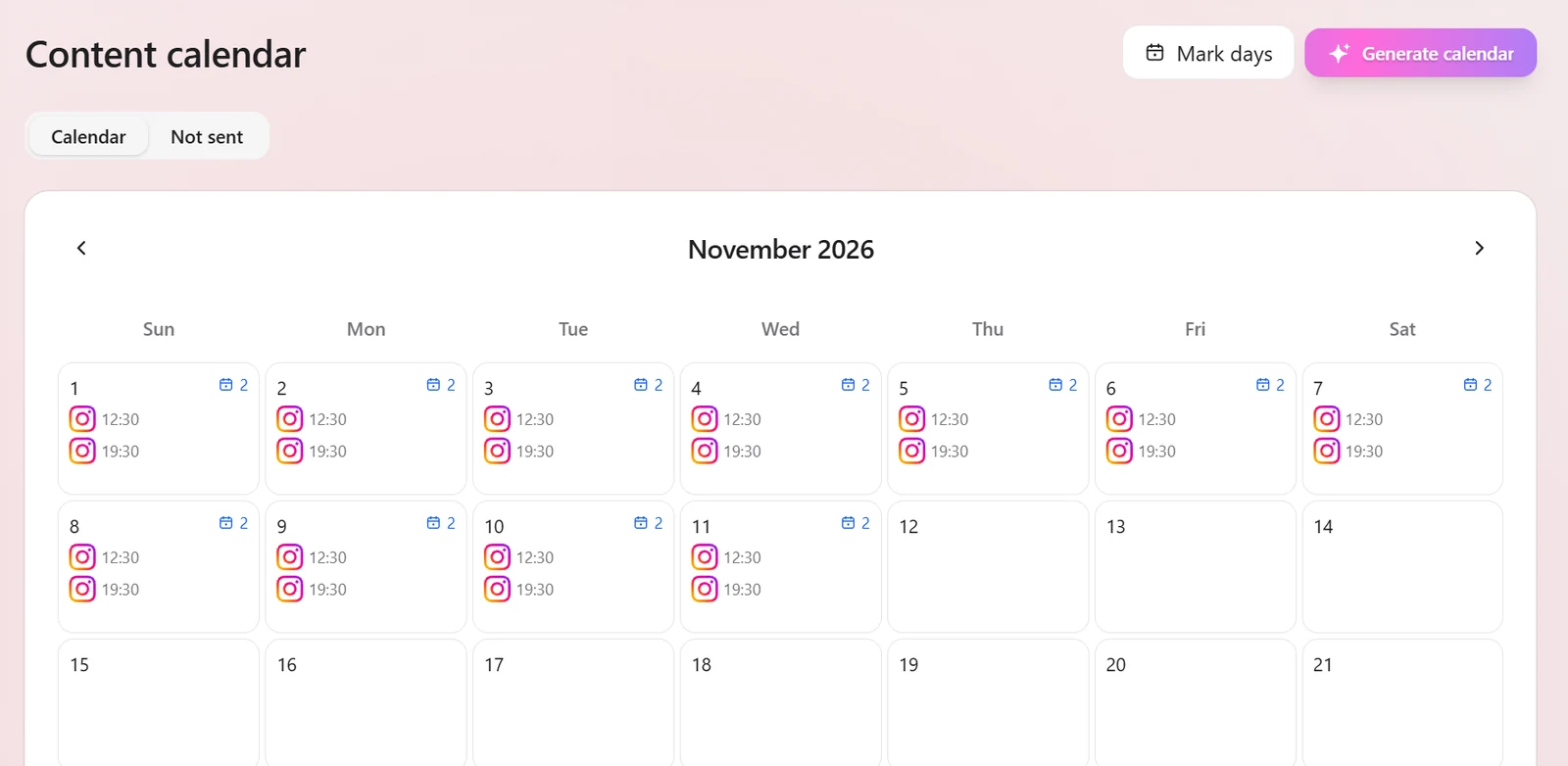
Plan and schedule posts for your Facebook Page, Instagram, LinkedIn and TikTok from one place, and see what is scheduled at a glance.
Growth: Black Friday deal: $69 a month for 12 months, then $89. New customers only, renews until you cancel.
Sell on Shopify? Get it on the Shopify App Store

Not just the first month.
Join during the deal and pay this price every month for 12 months.
Ads and social media for one business
A$440 a month
A$440a month
More campaigns, AI and ad platforms, with social media
A$740 a month
A$740a month
Ads and social media for you and up to 4 clients
A$1,240 a month
A$1,240a month
The deal ends Friday 4 December, 11:59 pm Sydney time.Your price stays for 12 months, then renews at our price at that time until you cancel.Cancel online any time in Settings, under Billing.
| What you get | Starter+ SocialA$279 a month | Growth+ SocialA$509 a month | Agency+ SocialA$949 a month |
|---|---|---|---|
| Ad platforms | 2 | 4 | All |
| Ad accounts | 4 | 8 | Unlimited |
| Social accounts | 5 | 5 | Unlimited |
| Team members | 3 | 5 | 15 |
| Workspaces | 1 | 1 | 5 |
| Storage | 3 GB | 6 GB | 25 GB |
| Each month | |||
| Campaigns | 20 | 60 | Unlimited |
| Scheduled posts | 60 | 60 | 150 |
| AI pictures | 75 | 165 | 430 |
| AI videos | 16 | 28 | 70 |
| AI video ads | 8 | 20 | 50 |
| AI credits | 31 | 31 | 58 |
Ad spend is not included. Each platform bills your own ad account.
Pricing
Pick a plan and start growing today. Upgrade, downgrade or cancel anytime.
Black Friday deal: $69 a month for 12 months, then $89. New customers only, renews until you cancel
Ideal for growing teams and businesses
Black Friday deal: $179 a month for 12 months, then $249. New customers only, renews until you cancel
Complete solution for agencies and enterprises
Black Friday deal: $349 a month for 12 months, then $499. New customers only, renews until you cancel
Enterprise plan for marketing agencies
| What you get | Growth$69/month | Agency$179/month | Enterprise$349/month |
|---|---|---|---|
| Your workspace | |||
| Organisations | 1 | 5 | 10 |
| Team members | 3 | 10 | 30 |
| Scheduled posts a month | 60 | 150 | No monthly cap |
| X posts a month | 30 | 50 | 100 |
| Storage | 1 GB | 5 GB | 150 GB |
| AI each month | |||
| AI images | 15 | 30 | - |
| AI post writing | ✓ | ✓ | ✓ |
| Studios and tools | |||
| Content library | ✓ | ✓ | ✓ |
| Image Studio | ✓ | ✓ | ✓ |
| Autopilot (beta) | - | - | ✓ |
On every plan: Content calendar, Team roles and post approvals, Likes and comments for Facebook, Instagram and LinkedIn Page posts, Claude connector.
Why it's different
The app drafts your posts, ideas and pictures. You check every post before it goes out.
Glivyx for Social Media · Growth
$69a month
Black Friday deal: $69 a month for 12 months, then $89. New customers only, renews until you cancel.
Business plans elsewhere
$58–$1,697a month
For 3 people with post approvals, across six well-known social media tools: 4 cost $58 to $98 a month, and 2 cost $1,697.
“Many other tools” and the prices above sum up what six well-known social media tools show on their own price pages, checked on 29 October 2026: the cheapest way to get post approvals for 3 people on about four social accounts, billed monthly where they show it, otherwise their yearly price per month. Their prices are converted at the Reserve Bank rate on 29 October 2026 (1 to 1.4178). Their plans include things ours doesn't, and they change, so check before you decide.
Meet Glivyx
Glivyx is our flagship AI marketing app. It watches what is rising in your niche, drafts on-brand posts in your voice, and schedules them once you have checked them. Built by Odo Marketing.
One composer for your Facebook Page, Instagram (feed posts and Reels), LinkedIn and TikTok, with X on every plan. TikTok videos you post from it go straight to your account, and you choose who can see each one.
It drafts a batch of posts over the days you pick, up to 30, and nothing is scheduled until you approve it. Once five Facebook or Instagram posts are measured, posting times come from your own results.
See likes and comments for your Facebook Page, Instagram and LinkedIn Page posts in one place, and how each Facebook and Instagram post did against your usual.
Align your entire organisation instantly. Managers can pin campaign updates, deadlines, or strategy shifts directly to the team dashboard. Everyone sees it the moment they log in.
Omni-Channel Publish
Pinned Announcement
New Campaign Starts Monday
Omni-Channel Publish
Pinned Announcement
New Campaign Starts Monday
What Glivyx does
Your social in one app: Facebook, Instagram, LinkedIn and TikTok, with X on every plan.
Create
Glivyx reads your brand profile (imported straight from your website, no retyping) and writes with your audience, values and selling points in hand. Turn on per-platform tailoring and one idea becomes a long LinkedIn post, a tight X post and a visual-first Instagram caption, each written for how that feed actually works.
Plan
Pick a date range, platforms and a theme, with themes Glivyx suggests for your industry, and it drafts the whole run, visuals included. Nothing is scheduled until you've reviewed it: edit any caption, swap any image, move any date, then confirm.
Measure
Likes and comments for your Facebook Page, Instagram and LinkedIn Page posts, gathered in one place each time you refresh. Results marks each Facebook and Instagram post against what is usual for your page, and once five posts are measured, generated calendars use the times your audience engaged.
Likes
Comments
Posting times from your results, after five measured Facebook or Instagram posts.
Under the hood
The app checks live public sources daily: trending searches and this week's popular discussions around your industry and your products. It keeps only the topics that fit your business, so some days there are none. Each topic comes with why it is rising now, a post idea and a few hashtags.
When you generate a calendar, posts start at set hours that suit your type of business.
Once 5 of your Facebook or Instagram posts have results, the app moves to the weekday hours when your own posts got the most engagement. An hour needs at least 2 posts before it counts, so one lucky post can't move your whole schedule.
Nothing is scheduled until you approve it.
See likes and comments for your Facebook Page, Instagram and LinkedIn Company Page posts in one place. The numbers update when you press Refresh.
Results shows how each Facebook and Instagram post did against your usual, once the post is 2 days old.
For Shopify stores
Odo Marketing AI is on the Shopify App Store. Install it, sign in and choose your workspace, and your products are there every time you create a post in Glivyx.
Pick a product and post it with its store photo, an AI picture of it in use or an AI close-up. The AI pictures start from your real product photo.
Products that sold best in the last 30 days are marked, so you can post what already sells.
Revenue, orders, average order value and top sellers for the last 30 days, plus sales by channel and country, in your Shopify admin.
The app can read your products and orders. It can't change anything in your store.
Start from the Shopify App Store and pay for your plan through Shopify.
Uninstall the app and its copies of your products and orders are deleted.
Everything included
Each plan sets how much of everything you get. The comparison under the prices shows what each one includes.
Written from your brand profile. You check every post.
A batch of posts drafted in one pass, reviewed by you.
12 branded card layouts for your posts.
Marketing images from a description.
Every asset in one place, shared with your team.
Likes and comments for Facebook, Instagram and LinkedIn Page posts.
Owner, admin, member, viewer. Per-person permissions.
Your organisation's logo in the sidebar and header.
Ask Claude to write, schedule and check your posts.
On the Enterprise plan: a week planned and designed, waiting for your approval.
Swipe to approve, edit or skip posts waiting for your sign-off.
Facebook and Instagram posts marked against what is usual for your page.
Works with Claude
Add Glivyx to Claude as a connector, then ask for what you need in plain words. Claude does the work in your Glivyx account, and everything it makes is there for you to check or change.
In Claude, open Settings, Connectors, Add custom connector.
Paste the address shown in Glivyx's Settings.
Sign in to Odo Marketing, choose the organization and allow.
Needs a Claude account that can add custom connectors. TikTok videos sent from Claude go to your TikTok inbox. You can remove the connection in Glivyx's Settings whenever you like.
Next week
This week, 3 days
AutopilotApprovals
All three approved. They post at the times above.
Autopilot, in beta
Tell Autopilot how many days a week you want to post. It picks the days and times, writes each post, designs the picture and sends the week to Approvals for you to check.
It reads your Facebook and Instagram results to find the days and hours that work for your page.
It designs a card for each post in your brand colours, or uses pictures from your library if you prefer.
Swipe to approve, edit or skip. Nothing Autopilot writes is published until you approve it.
Autopilot is in beta. It comes with the Enterprise plan. Start with Glivyx
Connect your accounts, import your brand, generate a batch, review it over coffee. That's the whole workflow.
Why Glivyx
Glivyx isn't a tool we resell. We built it, and our own team uses it for client work. When something doesn't survive contact with real marketing work, it gets fixed, not documented.
AI drafts your posts. You stay the editor: you check and edit every one, and nothing is scheduled until you confirm it.
Posting times, content themes and post structures all adapt to your business and your results. Two brands on Glivyx get two different playbooks, because they should.
How it works
Link your social platforms and tell Glivyx about your brand, voice and goals.
It pulls rising topics from live sources and builds content ideas around your brand profile and audience.
Draft on-brand posts with AI, check and edit each one, then schedule them across your accounts.
See likes and comments on your Facebook Page, Instagram and LinkedIn Page posts. After five measured Facebook or Instagram posts, posting times come from your own results.
FAQ
Glivyx is a project by Odo Marketing that we started in 2024. It brings together several apps and features for managing your marketing. In 2026 we opened Glivyx for Social Media to everyone, followed by Glivyx for Ads for paid ads. The other Glivyx apps have restricted access: fill in the form on this page to request them and our team will get in touch.
Glivyx is software (an AI marketing app) you can use yourself. If you'd rather have a team run it for you, our Social Media Management service pairs Glivyx with a dedicated Odo Marketing strategist.
Glivyx posts to your Facebook Page, Instagram (feed posts and Reels), LinkedIn and TikTok. X is on every plan, and each plan shows how many X posts a month it includes. TikTok videos you post from the composer go straight to your account, and you choose who can see each one.
Growth is $69 a month in Australia and $45 in the United States, Agency is $179 a month in Australia and $119 in the United States and Enterprise is $349 a month in Australia and $229 in the United States. Growth: Black Friday deal: $69 a month for 12 months. New customers only, and it renews until you cancel. The plans above show what each one includes.
Absolutely. Invite teammates with their own logins and roles (owner, admin, member or viewer) with per-person permissions on top. Nobody ever needs your platform passwords, and AI drafts stay drafts until a human approves them.
No. Generated calendars produce drafts you review, edit and confirm before anything is scheduled, and teammates' posts can wait for your approval. Glivyx drafts; you decide.
Your social account sign-ins are stored encrypted. Team access works through roles and invitations, so teammates never need your platform passwords.
Yes. Upgrade, downgrade or cancel any time from Billing. Upgrades apply immediately; downgrades and cancellations take effect at the end of the paid period, so you always get what you've paid for. If you pay through Shopify, change or cancel your plan in your Shopify admin.
Other Glivyx apps
Glivyx for Social Media is open to everyone. Our other apps are by request. Tell us what you need and our team will get in touch.
No waitlist
Pick a plan, connect your social accounts and start in minutes.